How to Fact-Check a Photo Like a Photographer
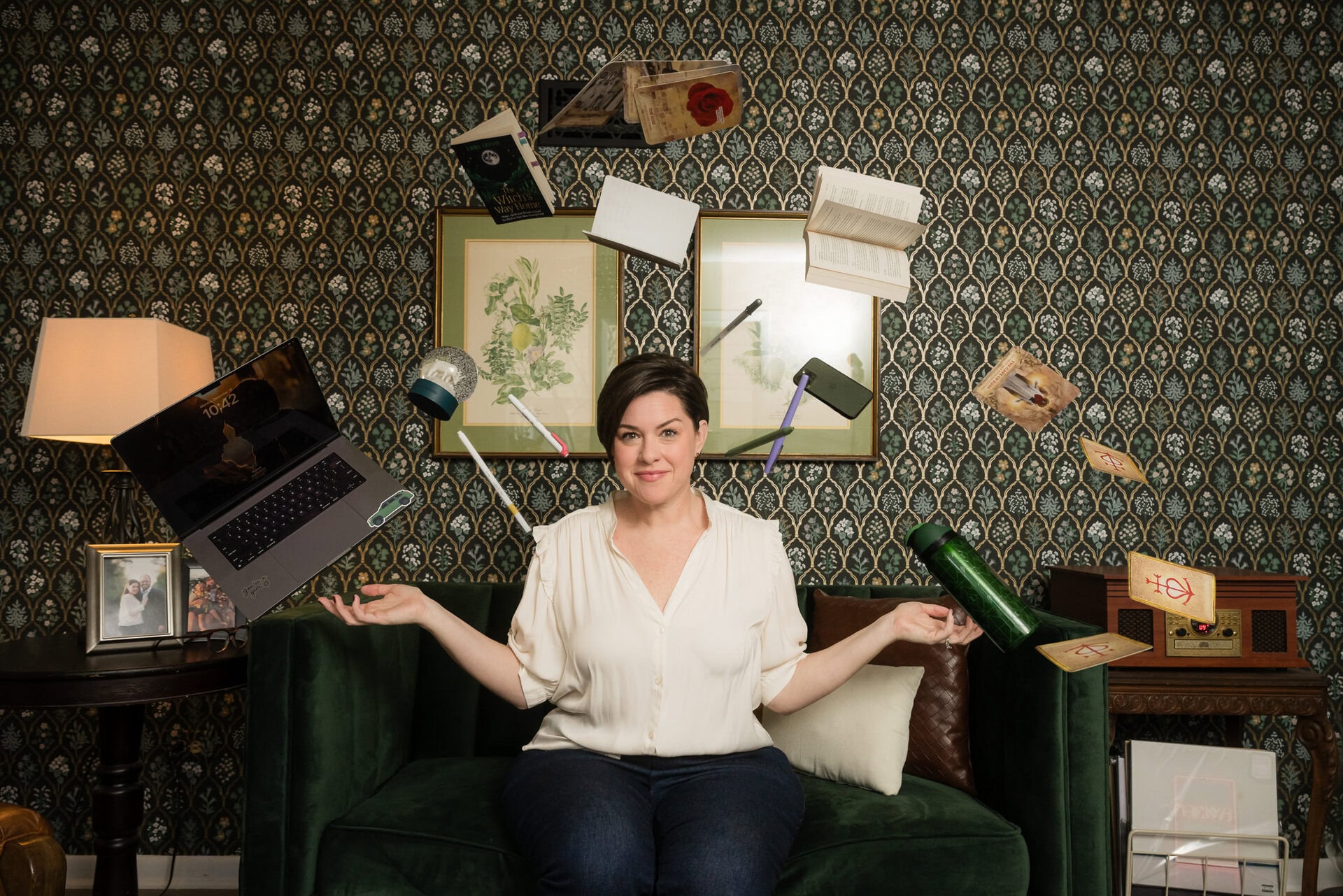
Is the header image AI or not? The answer is at the end…
Full disclosure: I used AI to help me research and organize this post. I’m telling you that upfront, because it’s the whole point of everything I’m about to say.
AI is a tool. An incredibly useful one. It is my assistant for so much. Brainstorming, trouble-shooting, and overcoming writer’s block.
Like any tool, it works best when a human mind is behind it — thinking critically, asking questions, and taking responsibility for what gets made or shared. That’s true whether we’re talking about writing a blog post or generating a photograph that never actually happened.
The internet is full of AI-generated images right now. Some are obvious. Many aren’t. And the older, faster part of our brains — the part that’s been wired since childhood to trust photographs as evidence — hasn’t caught up yet.
This post isn’t about making you overly suspicious every time you scroll. It’s about giving you a few tools that photographers already use — tools that will help you slow down, look more carefully, and know the difference between a moment that happened and one that was invented.
Here’s where to start.
Your eye knows a lot already
AI image generators have gotten remarkably good — but they’re still making mistakes, and they tend to make the same ones repeatedly. Once you know what to look for, you’ll start seeing them everywhere.
The image is an AI-generated headshot that I had created of myself. See if you can spot the evidence of it being AI.

Hands and anatomy.
This is still the biggest giveaway. AI struggles with hands — wrong number of fingers, merged knuckles, fingernails that don’t quite make sense. Ears, teeth, and hairlines are also commonly off. If something feels slightly wrong about a person’s face or body and you can’t name why, start there.
The “too perfect” quality
AI models are trained heavily on professional photography and images of models — people whose literal job is to look polished on camera. Real people are underrepresented in that training data. So AI-generated faces tend to trend toward an implausible, waxy kind of beauty. If everyone in an image looks like they just stepped off a magazine shoot, take a second look.
Objects that don’t actually work.
Look at the buttons on a shirt — do they have buttonholes? Check the zipper. Look at glasses — are there actual lenses? Watches often blur or distort at the edges. AI generates the visual idea of an object, not a functional one.

Physics that are slightly off.
Does the light on the subject match the light in the background? Are shadows going in the same direction? Do reflections add up? AI often assembles images from patterns rather than physical logic, and lighting is one of the first places that falls apart under scrutiny.
Text in the background.
This one’s almost always a dead giveaway. Read any signs, labels, or printed text in the image. AI-generated text is almost universally garbled — letters that don’t form real words, fonts that shift mid-sign, nonsensical combinations. If it looks like a word but isn’t quite one, that’s AI.
The skill here isn’t just knowing this list.
It’s slowing down. Our brains pattern-match incredibly fast and fill in details we didn’t actually see. Deliberate, unhurried looking is the whole practice.
The Truth: Your Eye Alone Isn’t Enough
Here’s something that surprised even me when I looked into it: most people — including trained professionals — score around 55 to 75 percent accuracy when tested on identifying AI images. That’s barely better than a coin flip.
And it’s getting harder. Newer AI models are now specifically designed to mimic amateur, imperfect photography — the slightly grainy, slightly off-center shot that used to signal “real.” The “too polished = AI” shortcut is already becoming unreliable.
This isn’t a failure of your intelligence. It’s a design problem. Knowing the limits of your own perception is part of being visually literate — which is exactly why the next tool matters so much.
Reverse Image Search: A place to start your verification
This is the one I use constantly, and it’s the most immediately useful thing you can take away from this post.
Real photographs leave a trail. They appear on multiple sites. They’re embedded in articles. They have context around them — a date, a location, a credited photographer, a story. They exist as part of a world.
AI-generated images are typically orphaned. They appear once, or get copy-pasted across platforms without any history or ecosystem. When you search an image and find nothing — or find the same image repeated endlessly without context — that’s a signal.
It also catches something even more valuable: the manipulated real. Sometimes the image you’re seeing is an actual photograph that’s been cropped, recolored, or stripped of context to change its meaning entirely. The reverse search leads you back to the original — and suddenly the “proof” someone was sharing tells a completely different story.
Here’s how to do it:
First, you’ll either need a screenshot of the image in question or you’ll need to right click on it to download it to your camera roll.
Then:
What to look for in the results:
Bonus tool: TinEye is worth bookmarking alongside Google Lens. It’s specifically built for tracking where images have appeared over time and can identify modifications — useful when you want to trace whether an image has been altered from its original.
Going Deeper: The Metadata Layer
For those who want to go further, there’s a layer of information embedded in image files that most people never see.
A system called Content Credentials (part of a standard called C2PA) works like a nutrition label for digital images. When a photo is made with a camera or AI tool that supports this standard, its origin — whether it was captured by a camera or generated by an AI — is cryptographically signed into the file’s metadata. Google’s “About This Image” feature taps into this information. Most cameras can embed it at the moment of capture – even your phone’s camera.
The catch: most social media platforms automatically strip metadata when you upload an image. So even if a photo was tagged at the source, that information often disappears in normal posting workflows. The infrastructure is being built — it just isn’t seamless yet.
AI detection tools also exist — Hive Moderation, WasItAI, Sightengine among them. They’re worth knowing about, but none are definitive. They produce false positives, and they get outpaced by new AI models regularly. Use them as a starting point, not a verdict.
What This Means for Trusting Images Online
Images were often used to function as a form of evidence. A photograph meant something happened. That’s been changing for a long time now since the invention of Photoshop. AI has only accelerated that change.
Coupled with the fact that anyone can create a photo using AI, it means the burden of proof has moved exponentially. It’s now on the viewer to ask questions, not assume.
Context is everything. Where did you find this image? Who shared it, and what are they trying to get you to feel or do? The absence of an AI label doesn’t mean something is real. The presence of a “real photo” caption doesn’t mean it’s being used honestly.
Stock photo libraries are increasingly contaminated with AI content. Platforms are still inconsistently enforcing disclosure. This is genuinely new territory — and navigating it well is a skill, not a given.
One Habit That Changes Everything
You don’t need to become a forensic analyst. You don’t need to approach every image with suspicion or drain the joy out of what you scroll through.
You just need one pause built into your reflex: before I share this, before I cite this, before I feel something strong because of this — does this image have a body behind it? Does it have a story I can actually find?
That’s it. That’s the whole practice. A moment of deliberate looking instead of fast believing.
Real photographs carry something AI-generated images can’t replicate: the truth of having been there. And the more we practice looking for that truth, the harder it becomes to fool us.
—
Knowing how to spot a fake image is one skill. Understanding why AI produces them so easily — and what it means to use these tools responsibly — is a whole other conversation. That’s Part 2.